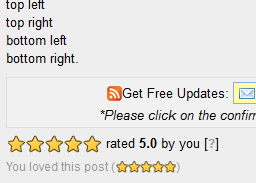
Star Rating Widget:- 2Ways to "add 'star rating' widge"t to blog post in blogger or website.


Making a visitor of your blogger to rate on your blog post by adding star rating widget below every post.Many bloggers want to know how their about thier post have satisfied to viewers or not.so to add star rating widget to your blogger or website follow below steps:-
                        FIRST WAY
step:1
Go to OUTBRAIN website and select options by registering and by adding your website and select blogger icon.
step:2:-
It directly redirects to your blogger and Import the widget by clicking on Add widget and make the arrangement of widget below blog post and save arrangement.Thats all you are done successfully.
Note:This take some time to update on your blogger or website.

                     SECOND WAY

step:1:-
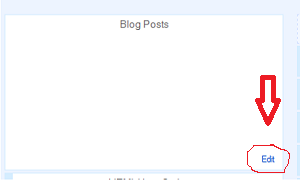
Login to your blogger and in layout or Page element see below picture:-


step:2:-
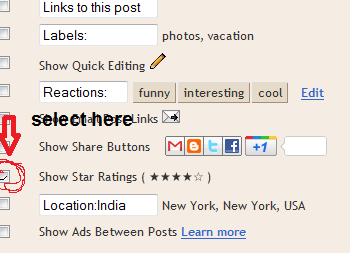
This is blogger inbulit widget.Tick at the box as shown in image:


 Save and you are done.


More..

Add smashing floating social sharing widget for blogger

Photobucket
Part1
Gotoblogger>>login>>Edit html>>Tick Expand widgets box>>
By using ctrl+f search the code ]]></b:skin>
And above  ]]></b:skin> add the below code
Now,save your template and you are done 50% successfully.

position:fixed;_position:absolute;bottom:0px;left:0px;clip:
inherit;_top:expression(document.documentElement.
scrollTop+document.documentElement.client Height-this.clientHeight);_left:expression(document.documentElement.scrollLeft + document.documentElement.clientWidth – offsetWidth);}
#float_corner {padding: 5px; rder-bot
Step2:Now search the code </body> by using ctrl+f and
paste the below code above the </body>
<div id=’float_corner’>
<ul>
<script type=’text/javascript’>
(function() {
var s = document.createElement(&#39;SCRIPT&#39;), s1 = document.getElementsByTagName(&#39;SCRIPT&#39;)[0];
s.type = &#39;text/javascript&#39;;
s.async = true;
s.src = &#39;http://widgets.digg.com/buttons.js&#39;;
s1.parentNode.insertBefore(s, s1);
})();
</script><a class=’DiggThisButton DiggMedium’/><br/>
<script src=’http://tweetmeme.com/i/scripts/button.js’ type=’text/javascript’/><br/>
<a class=’google-buzz-button’ data-button-style=’normal-count’ data-locale=’en_IN’ href=’http://www.google.com/buzz/post’ title=’Post on Google Buzz’/>
<script src=’http://www.google.com/buzz/api/button.js’ type=’text/javascript’/><br/>
<script badgetype=’square’ src=’http://d.yimg.com/ds/badge2.js’ type=’text/javascript’>
ARTICLEURL
</script><br/>
<a href=’http://www.facebook.com/sharer.php’ name=’fb_share’ type=’box_count’>Share</a><script src=’http://static.ak.fbcdn.net/connect.php/js/FB.Share’ type=’text/javascript’/><br/>
<a href=’http://templates-widgets.blogspot.com/2011/03/floating-share-button-for-blogger.html>Get This</a><br/>
</ul>
</div>
Photobucket
save template and  100% o your work successfully.


More..

"Import Blog on Facebook":-Best new way to import the blog on facebook page

Having trouble with Importing blog
May bloggers felt sad on importing their blog on Facebook,because Facebook has disabled the option on recently.

Go to network blogs and signup by using facebook or new registration.
Photobucket
In the top menu you see that ‘add your blog’ option and submit your blog and it ask to verify the site by copy pasting the gadget on your blogger and click on verify.
And refresh the page and you see the all your blogger posts with share option on facebook and twitter.
More..

Facebook has recently removed the “import blog on facebook”option

Photobucket I can't see blogger import optionI facebook.
Badnews to blogger Facebook has recently closed the “import the blog” Option .This the bad news to new bloggers or new visitors who want to import the blog directly to facebook and keep update posts news to friends and fans on their fan page.But their is no problem .
 Here is the new way to import the blog to facebook to bloggers on my newpost
More..

Earn more money by infolinks on your blogger

Photobucket
Infolinks is affilate program like google adsense it doesnot take much space than google adsense it locates some of the words and some small buffering popups with ads only when the viewer move cursor on yhe specific word,
so join in the  infolinks and start earning money on your blogger.
Go to infolinks.com and register
Photobucket
Add the code is given to you copy it and pate it on blogger or directly the infolinks mangement add the ads on your site.
More..

The best way to Add wibiya toolbar to the blogger or wesite or wordpress

Photobucket Photobucket     
SEE THE DEMO AT THE BOTTOM OF MY BLOGGER
The wibiya toolbar is the best way of getting more traffic and also to get a free space in blogger,because the wibiya toolbar contains more gadgets in it.some of them are:-
Follow us on twitter.Facebook like button.
Facebook page.Tweets.
Amongs us(which shows online members & what they are copying from your site).
Live contact form between you and your blogger.
Rss Email subscription .
Google plus+1.
Social networking chat.
Games on your blogger
And many more gadgets.
Navigation links.
your can also Earn money more
By adding popular pop-up ad gadgets like ‘’infolinks’’,”clicksor” and many more you can see on my wesite by wibiya.
login to wibya and register
Photobucket
and Go for edit bar and choose your favourite gadets
choose your theme.
At below you can see blogger symbol by clicking on it it connects to blogger and it successfully.
       
SEE THE DEMO AT THE BOTTOM OF MY BLOGGER
The wibiya toolbar is the best way of getting more traffic and also to get a free space in blogger,because the wibiya toolbar contains more gadgets in it.some of them are:-
Follow us on twitter.Facebook like button.
Facebook page.Tweets.
Amongs us(which shows online members & what they are copying from your site).
Live contact form between you and your blogger.
Rss Email subscription .
Google plus+1.
Social networking chat.
Games on your blogger
And many more gadgets.
Navigation links.
your can also Earn money more
By adding popular pop-up ad gadgets like ‘’infolinks’’,”clicksor” and many more you can see on my wesite by wibiya.
login to wibya and register
Photobucket
and Go for edit bar and choose your favourite gadets
choose your theme.
At below you can see blogger symbol by clicking on it it connects to blogger and it successfully.
More..

How to “add ‘google adsense code’ inside the post or template’’ of blogger (or) website?

Photobucket
ADSENSE
Many of he bloggers want to earn more money from goole adsense by blog (or) website.To earn more money by google adsense ads the placement of ads should be perfect and good way.
Here is the trick you can place google adsense ad not only in sidebars and header. But also inside the post  as follows:
PART1
Login to Google Adsense >> get the google adsense code >>copy it.
PART2
Login to blogger >> Design >>Back Your Template>>Edit HTml>>Expand widgets
Find the below code:
<div class='post-footer'>
and after above code add below code with Replacing “Enter code here“your google adsense code
<p>
<!-- Start Google Ad>

Enter code here <!-- End Google Ad-->
</p>

PART3
save template and done.
More..

The new ''Aakash ubislate tablet in India for 3000rs'' and ''1700rs for student''

                                                 
The India’s ultra low cost Aakash tablet is finally here and is creating ripples all around. Datawind launched Ubislate in India, and the student version is named as the Aakash tablet. The aakash tablet is powered by Android 2.2 and boasts of multiple touch screen and Connexant CPU with HD video and accelerated graphics. Aakash tablet offers a web delivery platform that enables quality and interactive knowledge over the internet.
The CEO of Data Wind, Mr.Suneet Singh Tuli says ‘’This is a made-in-India product. Thank you for giving me the opportunity to do this.
Launched by the Telecom and Education Minister, Kapil Sibbal,
There is definitely no other touch pad tablet or computing device anywhere near the price of Aakash tablet. Aakash tablet is a new generation device which comes with attractive features. This is the world’s cheapest tablet pc. This tab is made for the requirement of the users and especially for student needs.
Mr. Suneet Singh Tuli says, ‘The final goal is to either provide the same features at a lower cost or provide better functionality and features at the same cost.’ The objective of Aakash is to deliver high quality, personalized and interactive knowledge module over the internet. The tablet is a computing device that is low in cost but rich in features. The tablet is also integrated with social networking applications like facebook, twitter etc.
The team of engineers at Datawind has come up with the upgraded version of the Aakash tablet. This udgraded version of Aakash is called Ubislate (Aakash2 tablet). Ubislate will be commercially available everywhere and to everyone. This next generation of Aakash is loaded with better features and specifications, and any person can buy it. You can now book your Ubislate here.
                                          Pre-Book Aakash Ubislate
Book at Here                               click here
                                                  Features
Main The main feature of this tablet is it also work as phone and Gprs connection also:-
Unbeatable Price Only Rs.2,999 for the UbiSlate
Monthly internet charges: Rs.98 / 2GB
High Quality Web Anytime & Anywhere: Connect via GPRS or WiFi
GPRS: Embedded modem eliminates the need for external dongles and allows Internet access everywhere
WiFi: Allows fast Youtube videos at hotspots
Fast web access even on GPRS networks, across the country using DataWind’s patented acceleration technology
Web, Email, Facebook, Twitter and much much more!
Multimedia Powerhouse:  HD Quality Video
Watching movies in the palm of your hand on a 7” screen Audio library software helps manage your full collection of songs
Applications Galore with Android 2.2: Games
Productivity software: Office suite
Educational software
Over 150,000 apps!
Full sized-USB port & Micro-SD slot Expand memory to 32GB
Use any ordinary pen-drive
    Even plug-in a 3G dongle
                                                   Configuration
Hardware Processor: Connexant with Graphics accelerator and HD Video processor
Memory (RAM): 256MB RAM / Storage (Internal): 2GB Flash
Storage (External): 2GB to 32GB Supported
Peripherals (USB2.0 ports, number): 2 Standard USB port 
Audio out: 3.5mm jack / Audio in: 3.5mm jack
Display and Resolution: 7” display with 800x480 pixel resolution
Input Devices: Resistive touch screen
Connectivity and Networking: GPRS and WiFi IEEE 802.11 a/b/g
Power and Battery: Up to 180 minutes on battery. AC adapter 200-240 volt range.
Software OS: Android 2.2
Document Rendering ;                                                                Supported Document formats: DOC, DOCX, PPT, PPTX, XLS, XLSX, ODT, ODP
PDF viewer, Text editor
Multimedia and Image Display Image viewer supported formats: PNG, JPG, BMP and GIF
Supported audio formats: MP3, AAC, AC3, WAV, WMA
Supported video formats: MPEG2, MPEG4, AVI, FLV
Communication and Internet Web browser - Standards Compliance: xHTML 1.1 compliant, JavaScript 1.8 compliant
Separate application for online YouTube video
Safety and other standards compliance
CE certification / RoHS certification Other: Additional Web Browser: UbiSurfer-Browser with compression/acceleration and IE8 rendering.


                                                   Accessories

Full set of accessory options: Car charger
External antenna
Keyboard case
Convert it into a laptop!
More..

How to ‘‘add a facebook like button’’ to blogger (or) website?

                                   Photobucket
Adding the facebook like button to the blogger or website may show (or) represent the way the viewers like your blog or website. This may increase your traffic and page rank in Google.

you can ‘’Add Facebook like button to your blogger (or) website”by the following Procedure:
PART1
Login to your Blogger >> template >> Edit html.
PART2
Download Full Template.
PART3
Now click on Expand widgets box.
Find the below code by pressing ctrl+f
<data:post.body/>
Now just above code paste the below code:
<iframe allowTransparency='true' expr:src='&quot;http://www.facebook.com/plugins/like.php?href=&quot; + data:post.url + &quot;&amp;layout=button_count&amp;show_faces=false&amp;width=100&amp; action=like&amp;font=arial&amp;colorscheme=light&quot;' frameborder='0' scrolling='no' style='border:none; overflow:hidden; width:100px; height:20px;'/>
PART4
Now save template. Its done by you successfully.
More..

Looking bad:-How to ‘‘disable or remove" light box feature’’ in blogger?

                                      
Photobucket
The blogger has introduced the  light box feature to view the images in a new way of blog.This way of viewing the images looks crazy.But some bloggers who don’t wish to add this type of features to their blog.They like to move with their own plans.
In the following tutorial i will explain how to ‘remove the light box feature in blogger’

PART1
Login to your blogger account  >>’’layout ‘’>>  ‘’Add a gadget’’ >> ‘’Html java script’’
PART2
Now copy the below code in the ‘’Html Java script box’’
<script type="text/javascript">
//<![CDATA[
function killLightbox() {
var images = document.getElementsByTagName('img');
for (var i = 0 ; i < images.length ; ++i) {
images[i].onmousemove=function() {
var html = this.parentNode.innerHTML;
this.parentNode.innerHTML = html;
};
}
}

if (window.addEventListener) {
window.addEventListener('load',killLightbox,false);
} else {
window.attachEvent('onload',killLightbox);
}
//]]>
</script>
Now click on ‘save’ and you have disabled the light box feature in your blogger.
More..

How to 'add ‘‘flying twitter bird’’ widget' to blogger?

A Twitter bird which fly's on your website/blogger relating the page scroll and sit with a cute look on a side of page.when a visitor mouse hover on it it shows “Tweet This and Follow Us”and when clicks redirect to Twitter site.
Advantages:
►Increase Twitter followers
►Attractive look
►Get more Subscribers and Page views.
Part1
Login to your blogger>>  ‘’layout’’>>  ‘’Add a gadget’’>> ‘’Html java script’’.
Now copy and paste the below code by replacing username with your “Twitter Username” in your Html java script box.
<!-- Twitter Bird Widget for Blogger by Way2blogging.org -->
<script type="text/javascript" src="http://widgets.way2blogging.org/blogger-widgets/w2b-tripleflap.js">
</script>
<script type="text/javascript">
var twitterAccount = "USERNAME";
var tweetThisText = " <data:blog.pageTitle/> : <data:blog.url/> ";
tripleflapInit();
</script>
<!-- Twitter Bird Widget for Blogger by Way2blogging.org -->
Part2
Then click on save and you are successfully added the flying twitter bird to your blogger.

Credits: Way2blogging.
More..